


Service Update September 14
Delivery Center
Pre-Check Visit: Help Customers Catch Fit Risks Before Delivery Day
Failed deliveries caused by items that don’t fit through an entrance, hallway, elevator, or into the intended room are costly and frustrating for everyone involved.
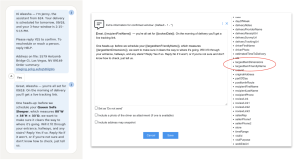
With this release, Jenny can use product inventory data to identify the largest item in an order and make its friendly name and dimensions available directly in message templates.
This means you can use message variants to proactively start a Product Fit pre-check and ask customers to verify that the item will fit before delivery day — using specific product information instead of a generic question.
🚀 Coming soon
We’re taking pre-delivery checks further with an AI-driven flow designed to identify potential delivery risks before delivery day — across furniture, appliances, medical equipment, and more.
The goal: fewer failed deliveries, less manual work, and a smoother experience for both your team and your customers.
Stay tuned!
👉Reach out to the PAI Customer Support team if you need guidance on setting up a Product Fit conversation.
🌐 AddressIQ HUB Enhancement
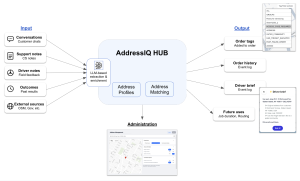
As a reminder, AddressIQ Hub turns delivery conversations and operational inputs into structured, reusable address knowledge.
With this enhancement, AddressIQ now uses more data sources — including customer conversations, driver and installer notes, forms, CS notes, manual address resolutions, and historical delivery context.
Using AI, the platform identifies and summarizes relevant location insights automatically, while still allowing teams to manually review and edit the address record when needed.
This helps capture useful details such as access restrictions, elevator requirements, parking issues, hazards, and coordination needs — and reuse them for future deliveries.
🚀 Coming Soon: Shared AddressIQ
Soon, participating customers will be able to benefit from community-based address knowledge contributed across Package.ai accounts and industries.
The more organizations participate, the richer the knowledge becomes — helping teams identify risks earlier, improve driver readiness, expand address coverage faster, and reduce avoidable delivery failures.
👉In the meantime, we’d love your input: what other address or location information would you like AddressIQ to capture?
Faster Address Error Resolution
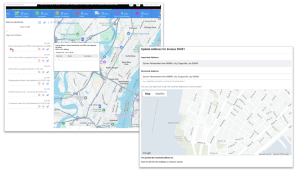
Fixing address issues from the route and stop list is now quicker.
📍When a delivery has an address-related error, clicking the warning icon now takes you directly to the address editor inside the order form, including the imported address, resolved address, and map.
No more searching through the order form to find where to make the correction — you land exactly where the issue can be fixed.
Enhanced Self-Scheduling Experience When No Slots Are Available
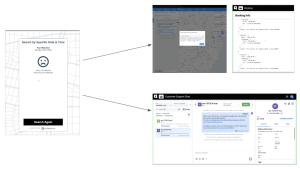
We’ve improved the self-booking experience for cases where no delivery slots are available.
Recipients can now contact an agent directly, while the conversation is automatically escalated with relevant context so your team can quickly understand what happened and assist.
We’ve also added a standalone Booking Troubleshooting page, giving Account Admins and Operators better visibility into why no slots were offered.
👉To activate this feature on a specific hub or all of them, please contact our Customer Success team.
Enhanced Real-Time Visibility for Customer Support Managers
We’ve added several improvements to the Customer Support Dashboard to make it easier to monitor workload and act on open conversations:
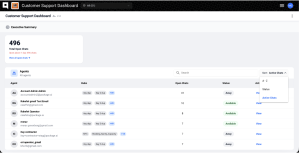
- Open Chats per Agent – See how many open chats each agent is currently handling, helping managers quickly identify workload and available capacity.
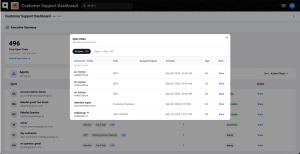
- Open Chats Drill-Down – Click View all open chats to view the full list of active chats, including hub, assigned agent, opened time, and a direct link to the conversation.
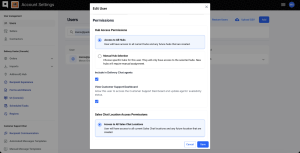
- User-Level Access Control – A new View Customer Support Dashboard permission lets admins decide exactly which users can access real-time support performance and agent activity.
Together, these updates give Customer Support managers better visibility, faster access to the conversations that need attention, and tighter control over who can see operational data.