
Service Update October 13
Delivery Center
Automatic Payment Sync to STORIS
Customer payments collected through Package.ai can now be automatically synced to STORIS, eliminating the need for store teams to manually enter payment records.
Once a payment is successfully collected, Package.ai uses the STORIS Apply Deposit integration to update the corresponding order. Sync activity is also visible in Sales Chat and Customer Support Chat, making it easy to confirm successful updates or identify issues.
👉 Enabling automatic payment sync can be done on Account Setting → External Data Integration configuration page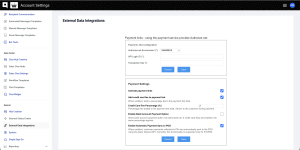
Support Transfer Tracking for Smarter Delivery Planning
We’ve enhanced the STORIS integration to automatically calculate the number of transfer legs for each imported item, providing better visibility into how many transfers are required before an item reaches its delivery hub.
This information can now be used in automated tagging rules to identify orders involving multiple transfers, helping teams improve delivery planning and avoid scheduling deliveries before goods are expected to arrive.
👉 Contact PAI Customer Success team for assistance configuring multi-leg transfer tagging rules.
Smarter Delivery Scheduling with Tag-Based Lead Time
A new functional tag to automatically add extra calendar days to an order’s earliest shipping date is available, helping ensure deliveries are scheduled only when goods are expected to be ready.
This is especially useful for orders requiring multiple warehouse transfers or additional preparation time.
This reduces premature bookings, avoids unnecessary rescheduling, and improves delivery reliability by automatically adjusting delivery availability based on each order’s requirements.
The new capability is available through the existing Tag-Based Fields configuration, allowing you to define how many extra days to add for each tag.
👉 Contact PAI Customer Success team for assistance with configuration.
Improved Photo Gallery in the Order Form
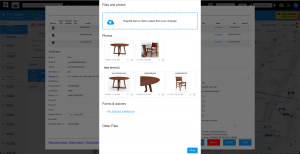
We’ve refreshed the photo gallery in the Order Form with a cleaner, more organized layout, making it easier to review delivery photos and investigate delivery issues.
Photos are now displayed in a structured grid, grouped by order-level and item-level photos. Photos uploaded through the Driver App or Desktop also include a timestamp, providing better visibility into when each photo was added and improving delivery documentation.
New Tags Filter in the Orders Page
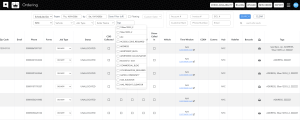
We’ve enhanced the Orders page with a new Tags filter, making it easier to find and manage orders based on their assigned tags.
You can now select multiple tags to narrow down your results, with only orders matching all selected tags displayed. We’ve also added a Tags column to show all tags associated with each order and reorganized the filters for a cleaner, more intuitive experience.
The benefit: Quickly identify orders that require special attention, streamline operational workflows, and reduce time spent searching through orders.
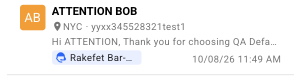
Order ID Now Visible in the Customer Support Chat (Inbox)
We’ve enhanced the Customer Support Chat to display the Order ID directly on each conversation card, next to the hub name.
Customer support agents can now quickly identify which order a conversation relates to without opening the chat.
Booking Widget Now Returns Guest Notes
We’ve enhanced the Booking Widget to return guest notes alongside the selected booking date and time when embedded in a customer website.
Guest notes continue to be saved on the order as Seller Notes, and can now also be captured by the hosting website, helping teams retain important delivery instructions and customer requests across their systems.
The enhancement is backward compatible with existing integrations. See the updated API documentation for integration details.
Sales Center
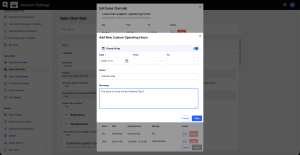
Store Closures Now Supported in Sales Chat Working Hours
We’ve enhanced the Sales Chat Working Hours configuration to allow stores to be marked as Closed on specific dates, without requiring a minimum working-hours window.
This makes it easier to manage holidays, special closures, and other non-operating days, ensuring that store availability is accurately reflected and customer communications align with actual operating hours.
Track Website Chat Conversions with Google Tag Manager
We’ve enhanced the Website Chat Widget to support tracking successful chat message submissions through Google Tag Manager (GTM).
The new website_incoming_message event is triggered whenever a customer successfully submits a message and includes the chat location, enabling retailers to measure chat conversions in Google Analytics.
This provides better visibility into customer engagement, helps evaluate website performance, and enables conversion tracking by store location.
The event is automatically available to all accounts using the widget, with no additional Package.ai configuration required.
Faster Access to Sales Chat for Sales Reps
Users with the Sales Rep role are now automatically redirected to Sales Chat upon login, providing faster access to their daily conversations.
Sales Chat opens with the “My Chats” filter and the user’s permitted locations already selected, helping sales reps focus on their assigned conversations without additional navigation or manual filtering.
Other user roles continue to use their existing login experience.
Reporting & API
Route Leg Distances Now Available in Reports & Public API
We’ve enhanced the Route Summary CSV report and Public API to provide a detailed breakdown of planned distances for every leg of a route, including travel from the warehouse to the first stop and the return trip to the warehouse, when applicable.
This will gain better visibility into route distances to optimize delivery planning, reduce unnecessary travel, and make more informed decisions about delivery-area coverage and operational costs.
The new data is available in:
- Route Summary CSV: The new plannedDistancePerLeg column lists planned distances in stop sequence, using the account’s distance unit (miles or kilometers).
- Public API: GET /v1/routes — see the updated API documentation for details on the new fields and response structure.
Enhanced API Security with Read-Only Access Tokens
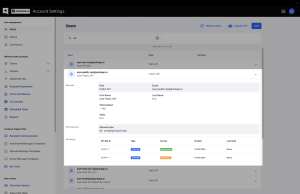
You can now generate Read-Only Public API tokens, providing a safer way to connect reporting, BI, and monitoring tools to Package.ai.
When creating an API token, you can choose between Read-Only and Read & Write access. Read-only tokens allow integrations to retrieve data without the ability to create, update, or cancel orders.
This improves security and reduces the risk of unintended changes by granting external integrations only the access they need. We recommend changing to read-only tokens in any integration that does not require write-access.
Existing API tokens remain unchanged, and Read & Write continues to be the default for newly created tokens.